
Beyond Consumer Cameras: Why Enterprise-Grade Security Is Gaining Ground in Homes
Consumer smart-home security kits have made basic monitoring accessible to nearly every homeowner, but for larger properties, high-value homes, and multi-building estates, enterprise-grade security infrastructure — the same category of equipment used in commercial and institutional settings — offers a meaningfully higher level of reliability, coverage, and integration. These systems combine professional-grade cameras, access control, alarm monitoring, and centralized management platforms that consumer-grade products simply aren’t built to deliver at scale.
Advertisement
Core Components of an Enterprise-Grade Home Security System
- IP Camera Network: Power-over-Ethernet (PoE) cameras with 4K resolution, advanced night vision, and AI-based object/person detection, centrally recorded on a network video recorder (NVR).
- Access Control Systems: Keycard, keypad, or biometric entry systems for gates, garages, and building entrances, often integrated with visitor logging.
- Professional Alarm Monitoring: UL-listed central station monitoring with redundant communication paths (cellular backup in addition to internet).
- Perimeter Detection: Driveway sensors, fence-line detection, and long-range motion analytics for large properties.
- Centralized Management Platform: A single dashboard integrating cameras, access control, and alarm status, often with mobile and remote monitoring capability for property managers or security personnel.
Consumer vs. Enterprise-Grade Security Comparison
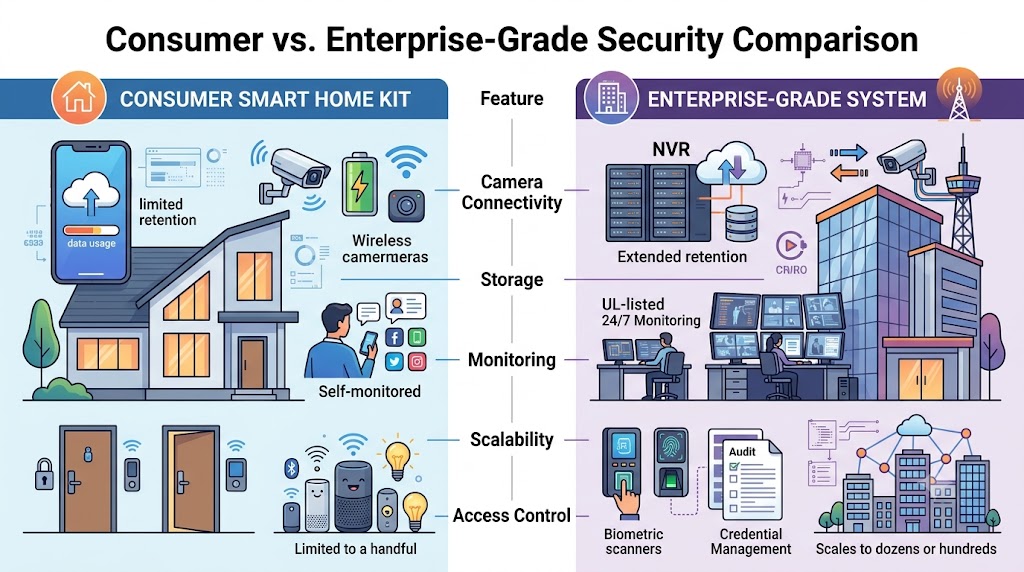
| Feature | Consumer Smart Home Kit | Enterprise-Grade System |
|---|---|---|
| Camera Connectivity | Wi-Fi, battery-powered | Hardwired PoE, continuous power and recording |
| Storage | Cloud subscription, limited retention | Local NVR storage plus optional cloud redundancy, extended retention |
| Monitoring | Self-monitored or basic third-party app alerts | UL-listed 24/7 professional central station monitoring |
| Scalability | Limited to a handful of devices | Scales to dozens or hundreds of devices across multiple buildings |
| Access Control | Smart locks only | Full access control with credential management and audit logs |
Installed Cost Breakdown
- Basic enterprise-grade camera system (6–10 cameras, NVR): $6,000–$15,000 installed
- Full property system with access control (gates, garage, entries): $15,000–$40,000
- Large estate or multi-building system with perimeter detection: $40,000–$100,000+
- Professional monitoring service: $50–$200 per month depending on coverage level
Why Professional Monitoring Matters
Self-monitored consumer systems rely on the homeowner to notice a mobile alert and respond, which introduces significant delay and risk of missed events. UL-listed central station monitoring services maintain staffed operations centers that verify alarms and dispatch law enforcement or emergency services immediately, and many enterprise-grade systems include redundant communication paths — meaning the system can still report an alarm even if the property’s internet or power is cut, a known vulnerability in basic Wi-Fi camera systems.
Integration With Smart Home and Building Automation
Enterprise-grade security platforms increasingly integrate with broader building automation systems, allowing security events to trigger lighting, HVAC, and access control responses automatically — for example, locking all doors and activating exterior lighting the moment a perimeter sensor is triggered. This level of integration typically requires a dedicated systems integrator rather than a standard alarm company, and is most common in larger custom home and estate projects where a full low-voltage design is part of the original construction plan.
How to Choose a Security Integrator
- Do they specialize in commercial/enterprise-grade systems, or primarily install consumer-grade equipment?
- Is their monitoring partner UL-listed and do they offer redundant cellular backup communication?
- Can they provide a network security assessment to ensure cameras and access control aren’t vulnerable to cyber intrusion?
- Do they offer ongoing service contracts for firmware updates, camera maintenance, and system health checks?
- Can they scale the system for future additions, such as new buildings or expanded perimeter coverage?
Cybersecurity Considerations for Connected Security Systems
Enterprise-grade systems are network devices, and poor configuration can create vulnerabilities. Best practices include placing security devices on an isolated VLAN separate from general home network traffic, using strong unique credentials for the management platform, keeping firmware updated, and disabling unused remote access features. A qualified integrator should address network segmentation and cybersecurity hardening as a standard part of installation, not an afterthought.
Common Mistakes Homeowners Make When Upgrading Security Infrastructure
A frequent mistake is purchasing consumer-grade Wi-Fi cameras piecemeal over time without a cohesive system design, resulting in a patchwork of devices from different manufacturers that don’t integrate into a single monitoring platform and often have inconsistent coverage with significant blind spots. Another common error is neglecting professional monitoring in favor of self-monitoring alone; while self-monitored systems are less expensive, they depend entirely on the homeowner noticing and correctly interpreting a mobile alert, which introduces meaningful response delay compared to a staffed monitoring center that can immediately verify and dispatch emergency services. Homeowners should also avoid placing security system components on default network credentials or without network segmentation, since internet-connected cameras and access control panels are a documented target for network intrusion when improperly secured. Finally, underestimating future scalability needs — installing a system sized only for current needs without considering future additions like a new detached structure or expanded perimeter coverage — often results in costly rework compared to specifying a system architecture that can scale from the outset.
Regional Security Considerations
Security system priorities vary somewhat by region and property type. Rural and large-acreage properties typically prioritize perimeter and driveway detection given the greater distance between the property line and the residence, often incorporating long-range motion analytics or fence-line detection not typically necessary on smaller urban lots. Properties in regions with significant seasonal weather events, such as hurricane-prone coastal areas, benefit from cameras and enclosures specifically rated for wind and water exposure, along with battery and cellular backup systems capable of maintaining monitoring through extended power outages. Gated communities and HOA-governed properties should confirm any exterior camera or access control installation complies with community architectural guidelines, which sometimes restrict visible equipment placement or require design review before installation.
Balancing Privacy and Security in Camera Placement
Thoughtful camera placement balances comprehensive coverage with reasonable privacy considerations, both for household members and neighboring properties. Many states have specific legal restrictions regarding camera placement that could capture a neighbor’s private property or interior spaces, and a qualified integrator should be familiar with these requirements when designing camera coverage for a property near a shared property line. Within the home, many families choose to limit interior camera coverage to common areas and entry points rather than private spaces like bedrooms, reflecting a common industry best practice even though it isn’t universally legally mandated. Discussing these placement decisions explicitly with your integrator during the design phase, rather than after installation, generally produces a system that better reflects the household’s actual comfort level.
Reading a Security Integrator Proposal Like a Professional
A trustworthy enterprise-grade security proposal should include a camera placement diagram showing coverage areas and any blind spots, along with specific camera model numbers, resolution, and storage retention period, rather than a vague reference to “professional-grade cameras.” Confirm the proposal specifies the NVR’s total storage capacity and how many days of continuous recording that represents at your chosen resolution and camera count, since this calculation is easy to overlook but directly affects how far back you can review recorded footage after an incident. For access control components, request documentation of how credentials are issued, revoked, and audited, particularly important for properties with staff, contractors, or family members who may need temporary or role-specific access. Finally, clarify what ongoing service is included versus billed separately — firmware updates, camera cleaning, and system health checks are often bundled into a service contract that should be clearly outlined rather than assumed.
Making the Final Decision: Phased Implementation
Given the significant investment involved in a full enterprise-grade security overhaul, many homeowners choose to implement systems in phases rather than all at once, starting with core camera coverage and professional monitoring before adding access control and perimeter detection in subsequent phases as budget allows. A well-designed system architecture should accommodate this phased approach without requiring costly rework later, which is another reason to prioritize working with an integrator who designs for future scalability from the outset rather than one focused only on meeting the immediate, minimum project scope. Discussing your long-term security vision during the initial consultation, even if the full scope won’t be implemented immediately, helps ensure early-phase equipment and infrastructure choices support rather than complicate future expansion.
Coordinating Security With Homeowners Insurance
Beyond protecting the property directly, a professionally monitored enterprise-grade security system often qualifies for homeowners insurance premium discounts, particularly when the system includes both intrusion detection and fire/smoke monitoring through the same monitored platform. It’s worth notifying your insurance agent once a new system is installed and requesting documentation of any applicable discount, since this benefit is sometimes overlooked by homeowners who don’t proactively report system upgrades to their carrier. Additionally, keeping a copy of the system design documentation, monitoring credentials, and service contract details in an accessible household file ensures that any future homeowner, property manager, or service technician can quickly reference the system’s configuration when needed, particularly valuable during a future property sale or if the system requires warranty service years after the original installation.
Key Terms Glossary
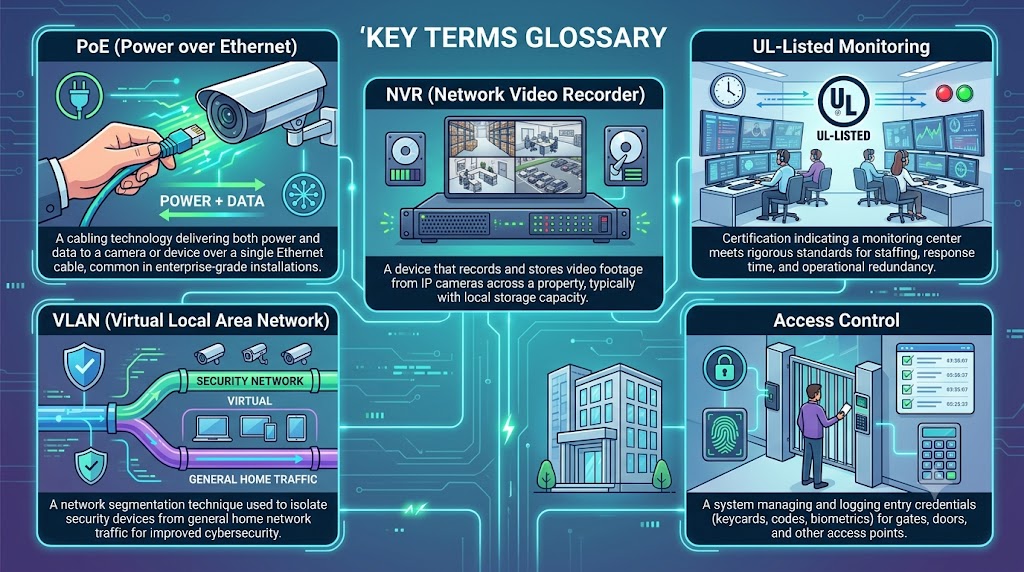
- PoE (Power over Ethernet): A cabling technology delivering both power and data to a camera or device over a single Ethernet cable, common in enterprise-grade installations.
- NVR (Network Video Recorder): A device that records and stores video footage from IP cameras across a property, typically with local storage capacity.
- UL-Listed Monitoring: Certification indicating a monitoring center meets rigorous standards for staffing, response time, and operational redundancy.
- VLAN (Virtual Local Area Network): A network segmentation technique used to isolate security devices from general home network traffic for improved cybersecurity.
- Access Control: A system managing and logging entry credentials (keycards, codes, biometrics) for gates, doors, and other access points.
Frequently Asked Questions
Is enterprise-grade security overkill for a typical home?
For standard single-family homes, consumer-grade systems are often sufficient. Enterprise-grade infrastructure becomes worthwhile for large properties, high-value homes, multi-building estates, or situations requiring professional monitoring and access control management. Homeowners uncertain which tier fits their situation can benefit from an initial consultation, which typically clarifies whether a hybrid approach — enterprise-grade cameras with a simpler monitoring plan, for example — might be the most cost-effective fit, balancing meaningful protection against the household’s actual risk profile and budget, rather than defaulting immediately to the most comprehensive (and most expensive) system tier available on the market.
Do enterprise-grade cameras require a subscription?
Local NVR storage typically avoids ongoing subscription fees for recording, though professional monitoring services and optional cloud backup do carry monthly costs.
Can an enterprise-grade system be retrofitted into an existing home?
Yes, though running wired PoE cabling in a finished home is more labor-intensive than new construction; many integrators use a hybrid approach combining wired and wireless components where full wiring isn’t practical.
What is UL-listed monitoring and why does it matter?
UL listing certifies that a monitoring center meets rigorous standards for staffing, response time, and operational redundancy, providing meaningfully more reliable emergency response than unlisted or self-monitoring services.
How long does installation take for a full property system?
Basic systems can be installed in 1–3 days, while large estates with full access control and perimeter detection may take several weeks, particularly if trenching for cabling is required.
What’s the real difference between self-monitoring and professional monitoring?
Self-monitoring relies entirely on the homeowner seeing and correctly responding to a mobile alert, while professional monitoring uses a staffed, UL-listed operations center that verifies alarms and can dispatch emergency responders even if the homeowner is unreachable, asleep, or traveling.
Can enterprise-grade security systems integrate with existing smart home devices?
Many enterprise-grade platforms offer integration options with popular smart home ecosystems, though the depth of integration varies by manufacturer; it’s worth confirming specific compatibility with any existing smart home devices during the proposal stage rather than assuming universal compatibility.
Request a Custom Security Assessment
Because enterprise-grade security is a significant investment involving both physical and network infrastructure, it’s worth requesting a detailed site assessment and proposal from at least two or three qualified security integrators. Compare monitoring quality, equipment tier, and long-term service support carefully. This article may contain affiliate links to vetted security integrator-matching services; we may earn a commission if you request a quote through these links, at no additional cost to you.
Advertisement